Synology DS224+ NAS Review: Best Home Media Server?
The Synology DS224+ is the most recommended 2-bay NAS for home users. After six months of daily use, here's whether it deserves that reputation.
BestElectronicsReviewed.com is a participant in the Amazon Services LLC Associates Program. We may earn a commission from qualifying purchases made through links on this page, at no extra cost to you.
The Synology DS224+ is the successor to the wildly popular DS220+ and occupies the same position: the default recommendation for anyone who wants a home NAS. At around $300 (drives not included), it is not the cheapest 2-bay NAS available, but the software ecosystem justifies the premium for most users.
Hardware Overview
The DS224+ runs an Intel Celeron J4125 quad-core processor clocked at 2.0 GHz (burst to 2.7 GHz), 2 GB DDR4 RAM (expandable to 6 GB), two drive bays accepting 3.5-inch or 2.5-inch SATA drives, two Gigabit Ethernet ports with link aggregation, and two USB 3.2 ports. The hardware transcoding engine in the J4125 is the key specification — it enables real-time 4K video transcoding for Plex and Jellyfin without dedicated GPU hardware.
The build quality is solid plastic with a tool-less drive installation system. Pop off the front panel, slide the drive trays out, snap in your drives, and slide them back. The process takes under a minute per drive.
Drives: What to Buy
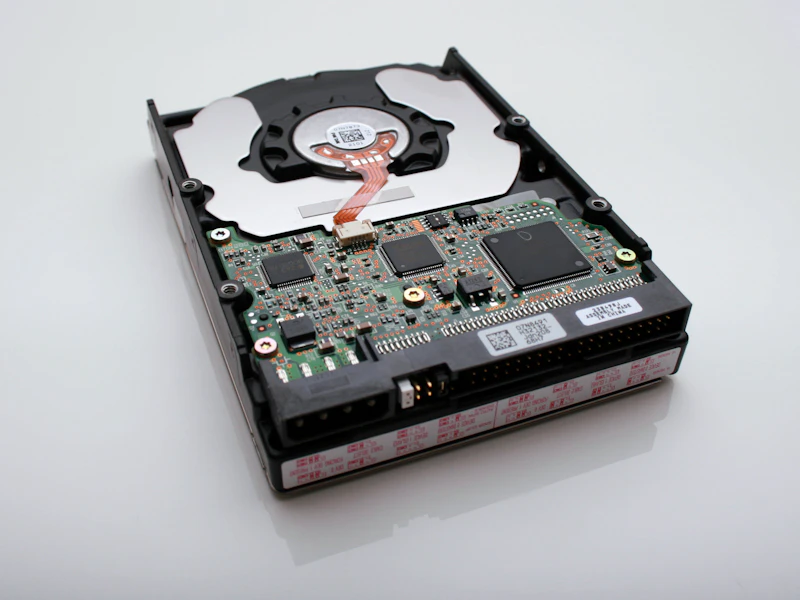
The DS224+ does not include drives. For most home users, we recommend two Seagate IronWolf 4TB NAS drives. IronWolf drives are designed for NAS workloads — they handle 24/7 operation, vibration from adjacent drives, and the constant read/write patterns that NAS usage creates. Standard desktop drives can work but are not rated for continuous operation.
In a RAID 1 (mirrored) configuration with two 4 TB drives, you get 4 TB of usable storage with full redundancy. If one drive fails, your data survives on the other.
DiskStation Manager (DSM)
Synology's DSM operating system is the primary reason to choose Synology over competitors. It is a full-featured, web-based OS that is genuinely pleasant to use. The interface resembles a desktop operating system, with a taskbar, application windows, and drag-and-drop file management.
Key applications include File Station for file management, Synology Photos for photo management (a capable Google Photos replacement), Synology Drive for file syncing across devices (similar to Dropbox), Hyper Backup for scheduled backups to external drives or cloud services, Surveillance Station for security camera recording, and Docker for running containers.
The package center offers dozens of additional applications, and Docker support opens the door to virtually any Linux application you want to self-host.
Media Server Performance
Running Plex Media Server on the DS224+ handles 1-2 simultaneous 4K transcodes thanks to Intel Quick Sync hardware transcoding. For direct play (no transcoding needed), it handles many more simultaneous streams. Jellyfin works equally well with hardware transcoding enabled.
Synology Photos processes and indexes photos with facial recognition and location tagging. Initial indexing of a large library (10,000+ photos) takes several hours, but once complete, the app is responsive and well-organized. It is the best Google Photos alternative for users who want to keep their photos private and local.
For music, the AudioStation app provides a Spotify-like interface for your local music library, complete with mobile apps for streaming on the go.
Performance Benchmarks
Sequential read speeds hit approximately 220 MB/s over a single Gigabit Ethernet connection — effectively saturating the link. With link aggregation using both ports, speeds approach 370 MB/s with a compatible switch. Random read/write performance for small files is adequate for home use but noticeably slower than an SSD-based NAS.
The 2 GB default RAM is sufficient for basic NAS operation with Plex and file sharing. If you plan to run Docker containers, Surveillance Station with multiple cameras, or Synology's virtual machine manager, upgrading to 6 GB is recommended. The upgrade requires a compatible SO-DIMM module and takes about ten minutes.
What Could Be Better
The biggest limitation is the Gigabit Ethernet ports. In 2026, 2.5 GbE should be standard at this price point. For most home users, Gigabit is sufficient, but if you transfer large video files regularly, the network becomes the bottleneck rather than the drives.
The plastic enclosure, while functional, feels less premium than QNAP's metal-bodied alternatives at similar prices. And the surveillance station license includes only two camera licenses — additional cameras require purchasing licenses at $50 each.
The Verdict
The Synology DS224+ earns its default recommendation status through DSM's software quality and the breadth of its application ecosystem. The hardware is adequate for home use, the setup is straightforward, and the ongoing experience is polished. If you want a NAS that works reliably and does not require constant tinkering, this is the one to buy.
Rating: 8.5/10
As an Amazon Associate, BestElectronicsReviewed earns from qualifying purchases.
Recommended Products
Top picks from our buying guides
Related Articles
Best Meeting Recorders and AI Meeting Transcription Tools for 2026
The mid-2026 meeting recorder landscape: Plaud hardware, Otter, Fireflies and Fathom software, Zoom/Teams/Meet built-ins, plus consent-law rules.
ReviewsEssential: Sony WH-1000XM5 Review: 6 Months Later (2026)
Essential: Sony WH-1000XM5 Review: 6 Months Later (2026) — expert analysis and tested recommendations from BestElectronicsReviewed.
ReviewsElectric Lawn Mowers in 2026: Battery Power Finally Rivals Gas
Battery electric lawn mowers have reached a tipping point — comparable power, quieter operation, zero emissions, and lower maintenance than gas. Here are the best options.