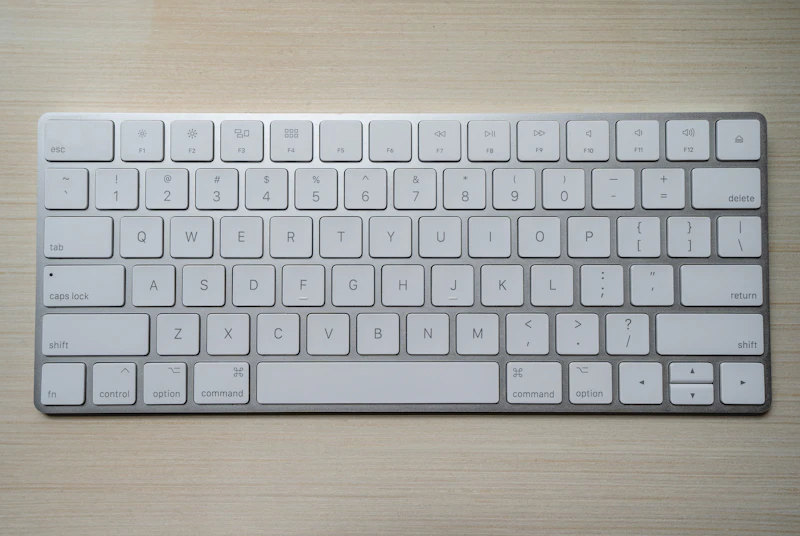
Logitech MX Mechanical vs Apple Magic Keyboard
Mechanical typing vs Apple minimalism. We compared these keyboards for two weeks of full-time office work to find the best typing experience for Mac users.
BestElectronicsReviewed.com is a participant in the Amazon Services LLC Associates Program. We may earn a commission from qualifying purchases made through links on this page, at no extra cost to you.
Mac keyboard buyers face a fundamental choice: Apple's own Magic Keyboard — slim, quiet, and seamlessly integrated — or Logitech's MX Mechanical — tactile, feature-rich, and designed for productivity. We used both for two weeks of full-time writing and coding to determine which delivers the better daily experience.
Typing Feel
Logitech MX Mechanical: Available in three switch options — Tactile Quiet (brown), Linear (red), and Clicky (blue). We tested the Tactile Quiet. The low-profile mechanical switches provide satisfying tactile feedback with each keystroke — a gentle bump that confirms actuation without the noise of full-size mechanical switches. Key travel is 3.2mm, significantly more than the Magic Keyboard.
Apple Magic Keyboard: Scissor-mechanism keys with 1mm of travel. The typing feel is flat, quiet, and precise. There is minimal tactile feedback — you rely on the key bottoming out to confirm a press. Typing is fast and quiet, but the shallow travel can lead to fatigue during extended sessions.
Winner: Logitech MX Mechanical. The mechanical switches are more comfortable and satisfying for all-day typing.
Noise Level
MX Mechanical (Tactile Quiet): Audible but not disruptive. The "thock" of the low-profile switches is pleasant to the typist and generally acceptable in a quiet office. Louder than the Magic Keyboard but quieter than standard mechanical keyboards.
Magic Keyboard: Near-silent. Even aggressive typing produces minimal sound. Ideal for shared offices, libraries, and open workspaces.
Winner: Apple Magic Keyboard for quiet environments. MX Mechanical for home offices.
Features
MX Mechanical: Backlighting with smart illumination (lights up as your hands approach), multi-device switching (three devices via Bluetooth or Logi Bolt), customizable keys via Logi Options+, Fn key row with standard function keys. Compatible with macOS, Windows, and Chrome OS.
Magic Keyboard: Touch ID built into the keyboard (iMac/Mac Mini), dedicated macOS function keys, USB-C charging, and seamless pairing with Mac. No backlighting on the standard model. Touch ID integration is genuinely convenient for authentication and Apple Pay.
Winner: MX Mechanical for features. Magic Keyboard for Touch ID integration.
Build Quality
MX Mechanical: Solid aluminum and plastic construction. Substantial weight (828g) prevents sliding. The build quality is premium and professional.
Magic Keyboard: Aluminum unibody with the thinnest profile of any keyboard. The build is quintessentially Apple — minimal, elegant, and lightweight. The Lightning-to-USB-C charging port on newer models is appreciated.
Winner: Tie. Different aesthetics, both premium.
Ergonomics
MX Mechanical: An integrated wrist rest (on the full-size model) and the additional key height from mechanical switches create a more natural typing angle. The slight incline reduces wrist extension.
Magic Keyboard: The ultra-flat profile forces a flat wrist position that can cause strain during extended typing. An external wrist rest helps but adds desk clutter.
Winner: MX Mechanical for ergonomic typing posture.
Ecosystem
Magic Keyboard: Pairs instantly with any Mac. Touch ID works system-wide. The Magic Keyboard is the only keyboard that supports Touch ID on Mac Mini and iMac.
MX Mechanical: Requires Logi Options+ software for customization. Multi-device switching works well. Flow software enables cross-computer cursor movement when paired with an MX mouse.
Winner: Magic Keyboard for Apple ecosystem. MX Mechanical for multi-device users.
Price
MX Mechanical Mini: $150 Apple Magic Keyboard with Touch ID: $199
Winner: MX Mechanical for price.
Read our home office equipment guide →
The Verdict
Buy the MX Mechanical if: You type for extended periods, value tactile feedback, work across multiple devices, or prioritize ergonomics.
Buy the Apple Magic Keyboard if: You want Touch ID convenience, near-silent typing, or the cleanest possible desk aesthetic. It is the best keyboard for Apple purists.
For writers, programmers, and anyone who types more than three hours daily, the MX Mechanical's mechanical switches provide a measurably better typing experience. For casual typists who value aesthetics and Apple integration, the Magic Keyboard is the natural choice.
As an Amazon Associate, BestElectronicsReviewed earns from qualifying purchases.
Recommended Products
Top picks from our buying guides
Related Articles
eero Pro 6E vs Nest WiFi Pro: Mesh Router Comparison
Two premium mesh router systems compete for your home network. We tested coverage, speed, setup, and smart home integration in a 2,400 sq ft home.
ComparisonsGuide: OLED vs Mini-LED Monitors: Which Display Is Better in 2026 (This Week)
Guide: OLED vs Mini-LED Monitors: Which Display Is Better in 2026 (This Week) — expert analysis and tested recommendations from BestElectronicsReviewed.
ComparisonsUpdated: OLED vs Mini-LED Monitors: Which Display Is Better in 2026
Updated: OLED vs Mini-LED Monitors: Which Display Is Better in 2026 — expert analysis and tested recommendations from BestElectronicsReviewed.