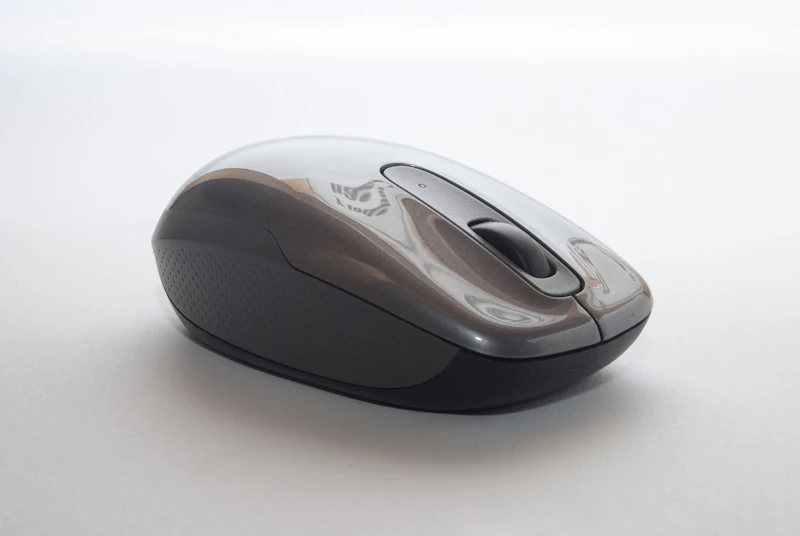
Logitech MX Master 3S Review: Still the Productivity Mouse King
Two years after launch, the MX Master 3S remains the default productivity mouse. We explain why nothing has dethroned it and whether you should still buy one.
BestElectronicsReviewed.com is a participant in the Amazon Services LLC Associates Program. We may earn a commission from qualifying purchases made through links on this page, at no extra cost to you.
The Logitech MX Master 3S launched in mid-2022. In the fast-moving world of tech, that makes it ancient. Yet as of March 2026, it remains the best-selling premium productivity mouse on Amazon, the top recommendation on Reddit's r/MouseReview for office use, and the mouse sitting on four out of five desks in our editorial office.
Why has nothing dethroned it? We dissected the Logitech MX Master 3S to explain its staying power.
The Electromagnetic Scroll Wheel
This is the feature that creates converts. The MagSpeed electromagnetic scroll wheel operates in two modes: ratchet mode for precise, line-by-line scrolling, and free-spin mode for flying through long documents and web pages. The transition between modes is smooth and instant — a flick of the finger switches from clicking through cells in a spreadsheet to scrolling through a 100-page PDF in seconds.
No other mouse on the market replicates this mechanism. Competitors offer either ratcheted scroll wheels or smooth scroll wheels. The MX Master 3S offers both, seamlessly, in one wheel. This single feature is why users refuse to switch.
Thumb Wheel for Horizontal Scrolling
Below the main scroll wheel sits a horizontal scroll wheel operated by the thumb. For spreadsheet users, video editors, and timeline-heavy workflows, this is transformative. Horizontal scrolling without holding Shift or using trackpad gestures becomes second nature within a day.
The Logitech MX Anywhere 3S is the travel-sized alternative that sacrifices the thumb wheel. For desk use, we strongly prefer the full MX Master 3S.
Multi-Device Switching
The MX Master 3S connects to three devices simultaneously and switches between them with a button on the bottom. Pair it with your work laptop, personal computer, and tablet. Press button 1 for work, button 2 for personal, button 3 for tablet. The switch takes less than one second.
Combined with Logitech Flow software, you can move your cursor directly from one computer's screen to another — like a software KVM switch. Drag a file from your work laptop and drop it on your personal computer. It sounds like a gimmick. It is not. It is a genuine productivity feature for multi-computer users.
Ergonomics After Extended Use
The MX Master 3S has a sculpted shape that tilts your hand to a 57-degree angle — between the flat position of a traditional mouse and the full vertical position of an ergonomic mouse. This compromise works remarkably well. After two years of eight-plus hours daily use, no editor has reported wrist or hand discomfort attributable to the mouse.
The silicone side grips remain grippy after years of use. The thumb rest is well-positioned for hands ranging from medium to large. Users with small hands should consider the MX Anywhere 3S instead.
Battery and Charging
A full charge lasts approximately 70 days with typical use. The USB-C charging port provides quick charging — one minute of charging gives three hours of use. In two years, we have forgotten to charge the mouse exactly twice. Both times, one minute on the charger got us through the rest of the workday.
What the Competition Offers
The Razer Pro Click V2 is the closest competitor. It offers a better sensor (for gaming-level precision that most office users will never notice), a lighter weight, and a more neutral shape. But it lacks the electromagnetic scroll wheel, the thumb wheel, and the three-device switching — the three features that define the MX Master 3S experience.
Apple's Magic Mouse remains popular among Mac users for its gestures and aesthetic. But its flat, non-ergonomic shape and lack of a proper scroll wheel make it inferior for all-day productivity work.
Should You Buy One in 2026?
Yes. Despite its age, the MX Master 3S has no successor announcement, no feature obsolescence, and no meaningful competitor at its $100 price point. USB-C charging, Bluetooth 5.0, and Logi Bolt wireless are all current standards. The software receives regular updates.
The only scenario where we would recommend waiting is if Logitech announces an MX Master 4 — which seems likely sometime in 2026. Even then, the 3S will remain excellent and may drop in price.
See our full mouse comparison guide →
Rating: 9.3/10 — The benchmark against which all productivity mice are measured.
As an Amazon Associate, BestElectronicsReviewed earns from qualifying purchases.
Recommended Products
Top picks from our buying guides
Related Articles
Essential: Sony WH-1000XM5 Review: 6 Months Later (2026)
Essential: Sony WH-1000XM5 Review: 6 Months Later (2026) — expert analysis and tested recommendations from BestElectronicsReviewed.
ReviewsElectric Lawn Mowers in 2026: Battery Power Finally Rivals Gas
Battery electric lawn mowers have reached a tipping point — comparable power, quieter operation, zero emissions, and lower maintenance than gas. Here are the best options.
ReviewsBest Baby Monitors in 2026: Video, Audio, and Smart Sensor Options
From simple audio monitors to smart sensors that track breathing, here are the best baby monitors for every parenting style and budget.