Why Mechanical Keyboards Are Worth the Premium for Most Typists
Mechanical keyboards cost 3-10x more than membrane keyboards. But for anyone who types more than an hour a day, the upgrade pays for itself in comfort and longevity.
BestElectronicsReviewed.com is a participant in the Amazon Services LLC Associates Program. We may earn a commission from qualifying purchases made through links on this page, at no extra cost to you.
Most people type on membrane keyboards — the flat, mushy keyboards that ship with computers or cost $15 at the store. They work. They are cheap. And most people have never considered that a keyboard could actually feel different.
But if you type for more than an hour a day — writing, coding, chatting, emailing — a mechanical keyboard transforms the experience. Here is why the upgrade makes sense for most typists, not just enthusiasts.
What Makes Mechanical Keyboards Different
Membrane keyboards use a single rubber dome sheet under all the keys. When you press a key, a rubber dome collapses, making contact with a circuit board underneath. The feel is mushy, inconsistent, and requires bottoming out (fully pressing the key) to register.
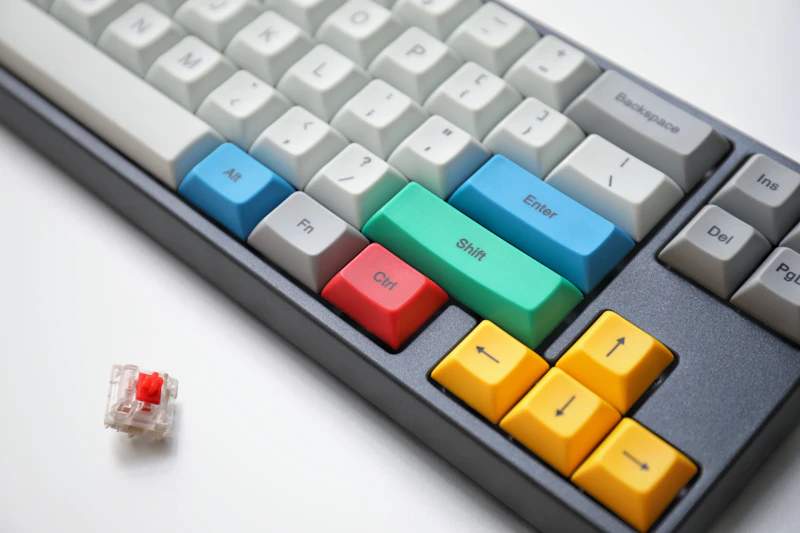
Mechanical keyboards use individual mechanical switches under each key. Each switch has a spring, a stem, and a housing that produce a distinct tactile response. You can feel exactly when the keypress registers, often before fully pressing the key down.
This difference sounds minor on paper. In practice, the typing experience is dramatically different — and once you use a mechanical keyboard for a week, going back to membrane feels like typing through mud.
The Three Switch Types
Linear Switches (Red, Black)
Smooth keystroke from top to bottom with no bump or click. Consistent resistance throughout the press.
Best for: Gaming (fast, repeated keypresses), quiet environments, people who prefer a smooth typing feel Sound: Quiet thock
Tactile Switches (Brown, Clear)
A noticeable bump partway through the keypress tells your finger when the keystroke registers. You do not need to bottom out.
Best for: Typing (documents, code, email), mixed use (typing + gaming), most office environments Sound: Moderate thock with a subtle bump feel
Clicky Switches (Blue, Green)
Tactile bump plus an audible click sound when the keystroke registers. The most satisfying typing feel for many people.
Best for: Dedicated typing, writers who enjoy audio feedback, home use Sound: Loud click — not appropriate for shared offices
For most people trying their first mechanical keyboard, brown (tactile) switches are the safest starting point — typing feedback without excessive noise.
Why It Matters for Typists
Reduced Typing Fatigue
Membrane keyboards require you to fully press each key to the bottom. Mechanical switches register midway through the keypress (called the "actuation point"). This means less finger travel per keystroke, which over thousands of keystrokes per day, significantly reduces hand and finger fatigue.
Faster Typing Speed
Most people who switch to mechanical keyboards see a 5-15% improvement in typing speed within a few weeks. The tactile feedback tells your fingers when to release and move to the next key, enabling faster transitions.
Fewer Errors
The tactile or audible feedback from mechanical switches reduces missed keystrokes. On a membrane keyboard, you sometimes press a key and it does not register because you did not press hard enough. Mechanical switches have consistent actuation force, reducing this problem.
Durability
Mechanical switches are rated for 50-100 million keystrokes per key. Membrane keyboards typically last 5-10 million keystrokes. A mechanical keyboard will outlast 5-10 membrane keyboards. The investment pays for itself in longevity alone.
The Budget Myth: Mechanical Keyboards Have Gotten Cheap
The perception that mechanical keyboards cost $150+ is outdated. Quality budget mechanical keyboards now start at $25-40:
Budget pick: The Redragon K552 (Red switches) costs about $25-35 and delivers genuine mechanical switches, an aluminum body, and RGB backlighting. It is the best-selling budget mechanical keyboard for a reason.
Mid-range pick: The Keychron K2 (Hot-Swappable) offers wireless connectivity, hot-swappable switches (change switches without soldering), Mac/Windows support, and a compact 75% layout. This is the keyboard we recommend to most people.
Premium pick: The Keychron Q1 Pro has a CNC-machined aluminum case, gasket-mount design for a premium typing sound, wireless, and hot-swappable switches. This is endgame-level quality without the $300+ custom keyboard price tag.
Common Concerns Addressed
"Mechanical keyboards are too loud for an office"
Red and brown switches with sound-dampening features are quiet enough for open offices. Many modern mechanical keyboards include foam dampening and silicone gaskets that reduce sound to levels comparable to aggressive membrane typing.
If noise is paramount, switches with built-in dampeners (Cherry MX Silent Red, Gateron Silent Brown) are specifically designed for noise-sensitive environments.
"I do not game, so I do not need a mechanical keyboard"
Gaming is actually the least compelling reason to buy a mechanical keyboard. Typing — document writing, coding, email — is where the tactile feedback, reduced fatigue, and improved accuracy provide daily benefits. Gamers often prefer linear switches, but typists benefit most from tactile switches.
"I type on a laptop keyboard all day and it is fine"
Laptop keyboards are membrane keyboards optimized for thinness, not typing comfort. If you type at a desk, an external mechanical keyboard with proper key travel and tactile feedback will feel vastly more comfortable. Many laptop typists who try a mechanical keyboard are shocked at the difference.
"Keyboards are not worth spending money on"
You touch your keyboard more than almost any other object you own. The quality of that interaction affects your comfort, speed, and even your wrist health over time. A $50-80 mechanical keyboard that lasts 10 years costs $5-8/year. That is exceptional value for something you use 8+ hours a day.
The Hot-Swappable Revolution
Modern mechanical keyboards with hot-swappable sockets let you change switches without any soldering. This means:
- Try brown switches. Do not like them? Pop them out and try red.
- A switch starts feeling worn after 5 years? Replace just that switch.
- Want a quieter keyboard? Swap to silent switches.
Hot-swap capability makes mechanical keyboards infinitely customizable and eliminates the risk of choosing the wrong switch.
Our Recommendation
If you type more than 1 hour per day and have never used a mechanical keyboard, start with a budget option and experience the difference. You will understand within a week why enthusiasts are passionate about keyboards.
- Try the $30 entry point — Redragon K552
- If you like it, upgrade to — Keychron K2 for wireless and hot-swap
- If you are hooked, explore — Keychron Q1 Pro for endgame quality
The keyboard is the most underinvested tool on most desks. A good one makes every hour of typing better.
Read our mechanical keyboard guide →
As an Amazon Associate, BestElectronicsReviewed earns from qualifying purchases.
Recommended Products
Top picks from our buying guides
Related Articles
Guide: Why USB-C Cables Are Not All the Same: A Technical Guide (Spring 2026)
Guide: Why USB-C Cables Are Not All the Same: A Technical Guide (Spring 2026) — expert analysis and tested recommendations from BestElectronicsReviewed.
Deep DiveWhy Ultrawide Monitors Are Better Than Dual Monitors
Two monitors or one ultrawide? After testing both setups extensively, the ultrawide wins for most people. Here's the detailed case.
Deep DiveWhy USB-C Cables Are Not All the Same: A Technical Guide (March 2026)
Why USB-C Cables Are Not All the Same: A Technical Guide (March 2026) — expert analysis and tested recommendations from BestElectronicsReviewed.