Why Everyone Is Switching to Mechanical Keyboards
Mechanical keyboards went from niche gaming accessories to mainstream productivity tools. Here's what's driving the shift and whether a mechanical keyboard will actually make you type faster.
BestElectronicsReviewed.com is a participant in the Amazon Services LLC Associates Program. We may earn a commission from qualifying purchases made through links on this page, at no extra cost to you.
Five years ago, mechanical keyboards were gaming peripherals with RGB lighting and aggressive aesthetics. Today, they're the fastest-growing segment of office peripherals, and the designs have matured to match. Premium wireless mechanical boards from Keychron, Logitech, and HHKB dominate work-from-home setups. Here's what changed and whether the hype is justified.
What Makes a Keyboard "Mechanical"
Standard keyboards (called "membrane" or "rubber dome") use a sheet of silicone with rubber bumps under each key. Press a key, the rubber dome collapses, and two membrane layers make contact. It works, but the tactile feedback is mushy, the actuation point is inconsistent, and the rubber degrades over time.
Mechanical keyboards use individual switches under each key. Each switch contains a spring and a contact mechanism that registers the keypress at a precise, repeatable point. The result is a consistent feel on every keystroke, a definitive tactile or audible "click" when the key actuates, and a lifespan measured in tens of millions of keypresses rather than a few million.
The Three Switch Types (And Which to Pick)
Mechanical switches come in three categories, identified by color:
Linear (Red, Black): Smooth keystroke from top to bottom with no bump or click. Preferred by gamers for fast repeated inputs. Can feel "empty" to typists because there's no tactile indication that the keypress registered.
Tactile (Brown, Clear): A noticeable bump partway through the keystroke tells your finger the key has actuated. This is the most popular choice for typing because the bump allows you to type without bottoming out the key, which reduces fatigue during long sessions.
Clicky (Blue, Green): A tactile bump plus an audible click sound on every keypress. Extremely satisfying for the typist, extremely annoying for everyone within earshot. Not recommended for shared workspaces or video calls.
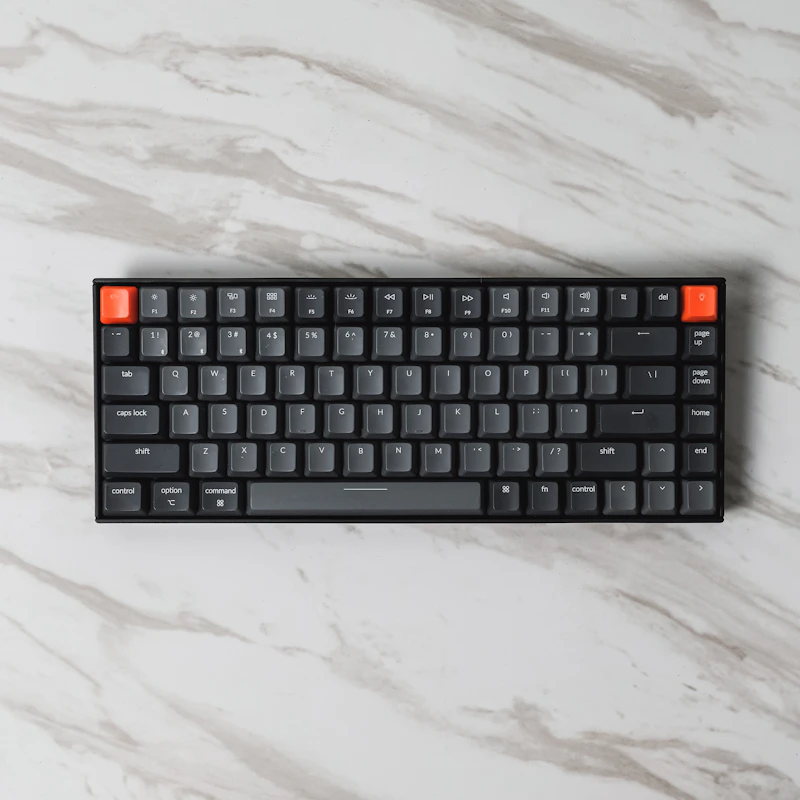
For office use, start with tactile (brown) switches. They provide the typing benefit without the noise. The Keychron K2 Pro ($90) with Gateron Brown switches is our recommendation for first-time buyers — wireless, compact 75% layout, Mac and Windows compatible, and hot-swappable (meaning you can change switches later without soldering).
Will You Actually Type Faster?
The honest answer: probably not immediately. Typing speed is primarily a function of practice and muscle memory, not keyboard hardware. Most people who switch to mechanical keyboards see a marginal speed improvement of 5-10 WPM after a 2-4 week adjustment period.
What mechanical keyboards definitively improve is typing accuracy and comfort. The consistent actuation point means fewer missed keystrokes and fewer double-presses. The tactile feedback reduces the force needed to confirm a keypress, which decreases finger fatigue during 8-hour typing days. Many users report that their wrists and fingers feel less tired at the end of the day.
Professional typists, programmers, and writers who type 4+ hours daily are the people who benefit most. If you type 30 minutes a day for emails, you probably won't notice enough difference to justify the cost.
The Hot-Swap Revolution
The biggest reason mechanical keyboards went mainstream is hot-swap sockets. Previously, changing switches required desoldering — a skill most people didn't have. Hot-swap boards let you pull switches out and snap new ones in without any tools.
This means you can buy a keyboard, try brown switches for a month, decide you want something lighter, and swap every switch in 20 minutes. It also means a broken switch doesn't require replacing the entire keyboard. Switch sample packs ($15-25) let you test different switch types before committing to a full set.
Noise Management for Shared Spaces
The number one complaint about mechanical keyboards is noise. Even "quiet" mechanical keyboards are louder than membrane boards. Here's how to minimize it:
- Use linear or tactile switches — never clicky in shared spaces
- Add O-rings to keycaps ($5 for a full set) — these dampen the sound of bottoming out
- Choose a keyboard with sound-dampening foam — premium boards include layers of foam between the PCB and case
- Use a desk mat — absorbs vibration that transfers through the desk
The Keychron Q1 Pro ($200) includes gasket mounting and internal foam that makes it quieter than most budget mechanical boards. It's the best option for office use where noise is a concern.
The Ergonomic Angle
Split mechanical keyboards — where the two halves separate and angle independently — are gaining popularity among programmers and writers with wrist issues. The Kinesis Advantage360 and ZSA Voyager position your hands at natural angles, eliminating the wrist pronation that causes repetitive strain injuries.
These are expensive ($300-450) and require a 2-4 week learning curve, but for people with existing wrist pain, they can be genuinely life-changing.
Bottom Line
Mechanical keyboards are worth trying if you type for more than 2 hours daily. Start with a $60-90 board with tactile switches and hot-swap sockets. Use it for a month before judging — the adjustment period is real. If you don't notice a difference after 30 days, return it. Most people who try one don't go back.
Read our full mechanical keyboard buyer's guide →
As an Amazon Associate, BestElectronicsReviewed earns from qualifying purchases.
Recommended Products
Top picks from our buying guides
Related Articles
Why Everyone Is Switching to Open-Ear Earbuds in 2026 (This Week)
Why Everyone Is Switching to Open-Ear Earbuds in 2026 (This Week) — expert analysis and tested recommendations from BestElectronicsReviewed.
TrendingThe Most Overhyped Products of 2026 (Skip These)
Viral marketing and influencer promotions don't equal quality. These are the products getting the most buzz in 2026 that we think you should skip.
TrendingThe Under-$30 Upgrades Our Readers Swear By
We asked our readers for their best tech purchases under $30. Over 2,000 responses later, these are the clear winners.