Logitech MX Keys S Review: Best Keyboard for Productivity?
The Logitech MX Keys S is the keyboard most frequently recommended for office work. After three months of daily use, here's whether it lives up to the hype.
BestElectronicsReviewed.com is a participant in the Amazon Services LLC Associates Program. We may earn a commission from qualifying purchases made through links on this page, at no extra cost to you.
The Logitech MX Keys S has become the default keyboard recommendation in nearly every "best keyboard for work" article. After using it as my primary keyboard for three months, I understand why — and I've also found the areas where it falls short.
First Impressions
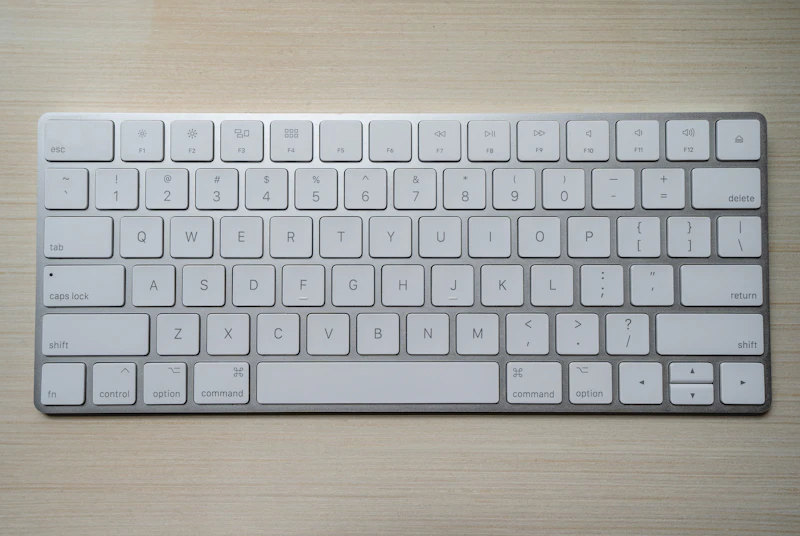
The MX Keys S looks and feels professional. The low-profile design, dark gray aluminum-esque top plate, and rounded concave keys give it a polished, desk-worthy appearance. It's a keyboard you can leave on your desk during a video call without embarrassment, which sounds trivial but matters in a work-from-home context.
At 1.76 lbs, it feels substantial without being heavy. The footprint is compact — no numpad waste — but a full numpad is included. If you enter numbers frequently, the numpad is essential. If you don't, the MX Keys Mini ($80) offers the same key feel in a smaller chassis.
Typing Experience
This is the MX Keys S's strongest selling point. The keys have a satisfying, soft-bottomed tactile feel with enough resistance to prevent accidental presses but not enough to cause fatigue. The concave key shape cradles your fingertips and improves accuracy — you'll notice fewer typos compared to flat-keycap keyboards.
Key travel is approximately 1.8mm, which is slightly more than a MacBook keyboard but less than a mechanical keyboard. It's the Goldilocks zone for productivity typing: responsive enough for fast typists, quiet enough for shared spaces, and comfortable enough for 8-hour days.
The keyboard is genuinely quiet. Typing in a quiet room produces a soft, muted sound — no clacking, no pinging, no annoying resonance. If you take calls while typing, your microphone won't pick up keystroke noise.
Smart Backlighting
The backlight adjusts automatically based on ambient light. In a dim room, keys illuminate gently. In a bright room, the backlight turns off to save battery. The proximity sensor also turns the backlight on when your hands approach and off when they leave.
This sounds like a gimmick, but it works flawlessly. In practice, you never think about the backlight — it just works. Battery life with the smart backlight enabled is 10 days of heavy use (8+ hours per day). With backlighting off, expect 5 months. The keyboard charges via USB-C, and a 3-minute charge provides enough power for a full workday.
Multi-Device Switching
The MX Keys S connects to three devices simultaneously and switches between them with dedicated keys (Easy-Switch buttons above the function row). Press button 1 for your work laptop, button 2 for your personal MacBook, button 3 for your iPad. Switching takes about 1 second.
This is transformative if you use multiple computers. Instead of moving keyboards or using a KVM switch, one keyboard serves all devices. Pair it with the Logitech MX Master 3S mouse (which has the same Easy-Switch feature) and you have a two-device setup with seamless switching.
Logitech's Flow software takes this further: move your mouse cursor to the edge of one screen and it jumps to the next computer's screen, dragging the keyboard focus with it. You can even copy text on one computer and paste it on the other. When it works, it's magical. When it doesn't (network issues, software crashes), it's frustrating.
Logi Options+ Software
Logitech's companion software lets you remap keys, create per-application shortcuts, and configure gestures. The function row can be customized so F5 launches Spotify on your personal machine and opens a terminal on your work machine.
The software works well on macOS and Windows. The initial setup requires creating a Logitech account, which is annoying, but once configured, everything syncs across your devices.
What I Don't Like
The Price
At $100, the MX Keys S is expensive for a membrane keyboard. Mechanical keyboard enthusiasts will correctly point out that excellent mechanical boards (Keychron K3, for example) are available at the same price with better switch options and hot-swappable customization.
The MX Keys S justifies its price through the multi-device switching, smart backlight, and Logi Options+ software. If you only use one computer, the Logitech K380 ($30) delivers 80% of the experience at 30% of the price.
No Adjustable Tilt
The keyboard has a fixed 2-degree tilt. There are no flip-out feet for steeper angles. Most users won't notice, but touch typists who prefer a higher tilt will need a keyboard tray or wrist rest to compensate.
Bluetooth Latency
Connected via Bluetooth, there's a barely-perceptible input lag (10-20ms) compared to wired or 2.4GHz wireless connections. For typing, this is unnoticeable. For gaming (which this keyboard isn't designed for), it would be problematic. The included Logi Bolt USB receiver offers lower latency if Bluetooth bothers you.
Who Should Buy the MX Keys S
The Logitech MX Keys S is ideal for professionals who type extensively, use multiple computers, and value a quiet, refined typing experience. It's the best keyboard in its category — low-profile wireless productivity keyboards — and the multi-device switching is genuinely useful for multi-computer setups.
If you use one computer, type casually, or prefer mechanical key feel, there are better options at this price. But for its target audience — desk workers who type 6-8 hours daily on multiple devices — the MX Keys S earns its premium.
Rating: 8.5/10
As an Amazon Associate, BestElectronicsReviewed earns from qualifying purchases.
Recommended Products
Top picks from our buying guides
Related Articles
Essential: Sony WH-1000XM5 Review: 6 Months Later (2026)
Essential: Sony WH-1000XM5 Review: 6 Months Later (2026) — expert analysis and tested recommendations from BestElectronicsReviewed.
ReviewsElectric Lawn Mowers in 2026: Battery Power Finally Rivals Gas
Battery electric lawn mowers have reached a tipping point — comparable power, quieter operation, zero emissions, and lower maintenance than gas. Here are the best options.
ReviewsBest Baby Monitors in 2026: Video, Audio, and Smart Sensor Options
From simple audio monitors to smart sensors that track breathing, here are the best baby monitors for every parenting style and budget.