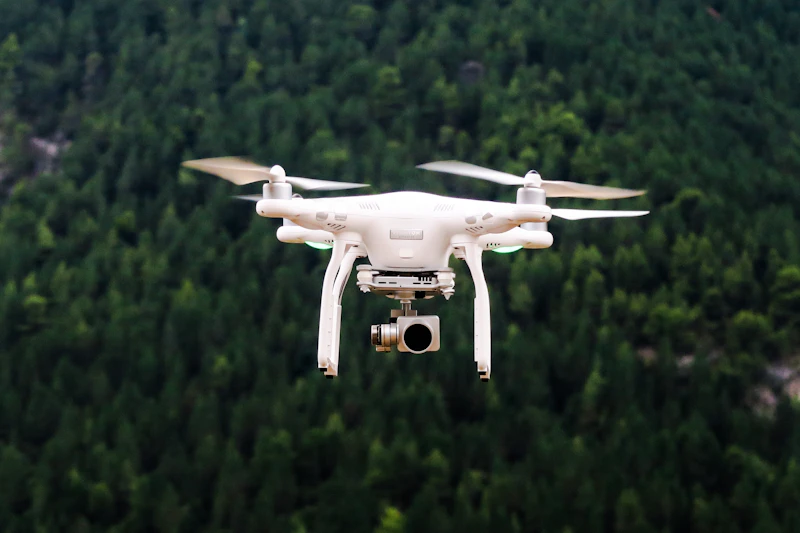
How to Choose the Right Drone for Aerial Photography
Camera drones range from $300 toys to $3,000 professional tools. Here's how to choose based on your skill level, what you want to shoot, and FAA regulations.
BestElectronicsReviewed.com is a participant in the Amazon Services LLC Associates Program. We may earn a commission from qualifying purchases made through links on this page, at no extra cost to you.
Aerial photography has become accessible to anyone willing to invest in a quality drone and learn the basics. Modern drones fly themselves, avoid obstacles, and shoot cinema-quality video. But the range of options is wide and the regulations are real. Here is a practical guide to choosing the right drone.
FAA Registration: Know the Rules First
In the US, any drone weighing 0.55 lbs (250g) or more must be registered with the FAA ($5 for 3 years). You must:
- Register at faadronezone.faa.gov
- Mark your registration number on the drone
- Fly below 400 feet altitude
- Keep the drone within visual line of sight
- Never fly near airports, stadiums, or emergency response areas
- Follow Remote ID requirements (most new drones have this built in)
The sub-250g loophole: Drones under 250g (0.55 lbs) have fewer restrictions. You do not need to register them for recreational use, and some sub-250g drones now shoot 4K video with excellent stabilization. This is the easiest entry point.
Drone Categories by Use Case
Casual Photography and Travel (~$300-600)
You want a drone that fits in a backpack, shoots good photos and video, and is easy to fly. You are not making money from the footage — you want nice vacation and landscape shots.
Our pick: The DJI Mini 4 Pro is under 249g (no FAA registration needed for recreational use), shoots 4K/60fps HDR video with a 1/1.3" sensor, has omnidirectional obstacle sensing, and fits in a pocket. This is the best drone for most people.
Serious Photography and Real Estate (~$800-1,500)
You need reliable obstacle avoidance, a larger sensor for better image quality, and professional features like D-Log color profiles and waypoint missions.
Our pick: The DJI Air 3 has dual cameras (wide and telephoto), 48MP photos, 4K/60fps, omnidirectional obstacle sensing, and 46-minute flight time. The telephoto lens is a game-changer for aerial photography — it compresses distance for a more cinematic look.
Professional Cinematography (~$1,500-3,000+)
For paid work, filmmaking, and the absolute best aerial footage. You need large sensors, Apple ProRes recording, and advanced flight modes.
The DJI Mavic 3 Pro and Air 3S occupy this tier. Hasselblad cameras, 5.1K video, ProRes support, and the best obstacle avoidance available.
FPV (First-Person View) (~$500-1,200)
FPV drones give you a pilot's-eye view through goggles. They fly faster, more aggressively, and create dynamic, cinematic footage that traditional drones cannot match. They require more skill to fly.
Our pick: The DJI Avata 2 is the most accessible FPV drone. Motion controller (tilt to steer), built-in stabilization, 4K/60fps, and beginner-friendly flight modes. It bridges the gap between traditional drones and hardcore FPV.
Key Specs That Matter
Camera Sensor Size
Larger sensor = better image quality, especially in low light. In order of quality:
- 1/2.3" — Phone-quality photos. Fine for social media.
- 1/1.3" — Significantly better dynamic range and low light. The sweet spot for prosumer drones.
- 1" — Near-dedicated camera quality. Professional results.
- 4/3" — Hasselblad-quality on DJI Mavic 3 series. Excellent.
Flight Time
Advertised flight time is measured in perfect conditions (no wind, hovering). Real-world flight time is 70-80% of the advertised number.
| Category | Advertised | Realistic | |----------|-----------|-----------| | Mini drones | 30-34 min | 22-27 min | | Mid-range | 40-46 min | 30-36 min | | Pro drones | 40-46 min | 30-36 min |
Always buy the Fly More Combo that includes 2-3 batteries, a charging hub, and a carry bag. One battery is never enough for a meaningful flight session.
Obstacle Avoidance
Modern drones use cameras, LiDAR, and sensors to detect and avoid obstacles. Coverage varies:
- Forward only — Budget drones. You must be careful flying backward or sideways.
- Forward + backward — Better but still has blind spots.
- Omnidirectional — Sensors on all sides. You can fly confidently in complex environments. Available on DJI Mini 4 Pro and above.
Wind Resistance
This matters more than people think. A drone that struggles in 15 mph wind produces shaky footage and drains battery fighting gusts. Most quality drones handle 15-25 mph winds, but check the spec — lightweight mini drones are more susceptible.
Essential Accessories
- ND filters — Reduce light reaching the sensor, allowing cinematic motion blur (especially during daytime). A set of ND filters for DJI (ND8, ND16, ND32, ND64) dramatically improves video quality.
- Landing pad — Provides a clean, visible takeoff and landing surface. Protects the gimbal from dust and debris.
- Extra batteries — As noted above, the Fly More Combo is always worth it.
- MicroSD card — V30 or V60 rated. A SanDisk Extreme 128GB is reliable and fast.
- Carrying case — Protects your investment during transport.
Tips for Better Aerial Photos
- Shoot during golden hour (sunrise and sunset) for the most dramatic lighting
- Use the rule of thirds — Enable the grid overlay in your camera settings
- Fly at different altitudes — The same location looks completely different at 50ft vs. 200ft vs. 400ft
- Slow your movements — Jerky pans look terrible. Fly smoothly and slowly for cinematic results
- Shoot in RAW — Gives you much more flexibility when editing photos
- Check the weather and wind before every flight. Use the UAV Forecast app.
Read our complete drone buying guide →
As an Amazon Associate, BestElectronicsReviewed earns from qualifying purchases.
Recommended Products
Top picks from our buying guides
Emart Photo Backdrop Kit with Stand and 3 Muslins
#1 in Best Photo Backdrop Kits 2026
Check PriceRelated Articles
eSIM for International Travel: Complete Setup Guide for iPhone and Android
Skip the SIM card shops at the airport. An eSIM gives you instant data in 190+ countries at a fraction of roaming costs. Here is how to set one up.
How-ToHome Network Wiring: Run Ethernet Through Your House Like a Pro
WiFi is convenient but ethernet is faster and more reliable. Here is how to run ethernet cables through your home without destroying your walls.
How-ToHow to Light a Video Call So You Look Professional
Lighting is the difference between looking washed out and looking polished on video calls. Here's a simple setup that takes 5 minutes and costs under $50.